Scenario: Impact of Adjacent Element Modification During Parallel Loop Processing #
- Threads process separate parts of an array. When adjacent array elements reside within the same cache line, modifications by different threads can lead to performance degradation.
- This is because even though threads are working on logically distinct elements, cache line invalidation forces threads to reload data unnecessarily.
False Sharing Illustration #
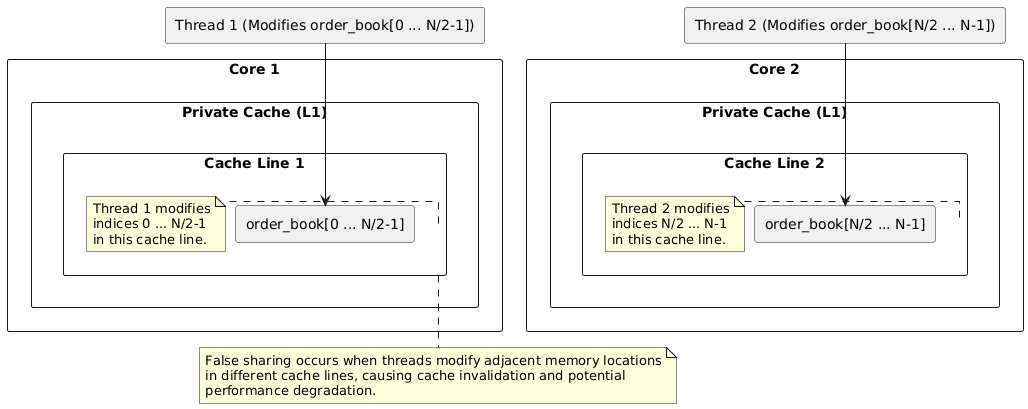
Code: Parallel Order Book Modification (Illustrating Potential False Sharing) #
Introduction to Order Books and Price Level Orders #
In financial markets, an order book aggregates buy and sell orders for an asset. Each order specifies:
- Price: The price at which the order is placed.
- Volume: The amount of the asset to be bought or sold at that price.
Orders are grouped by price level, representing the available buy and sell interest at different price points.
Code Breakdown #
#include <iostream>
#include <vector>
#include <thread>
#include <atomic>
#include <chrono>

const int NUM_THREADS = 4;  // Number of threads to use

// Structure for an order book level
struct OrderBookLevel {
    int price;    // Price of the order
    int volume;   // Volume of the order
};

std::vector<OrderBookLevel> order_book;  // Global vector holding the order book

// Function to modify orders in the order book
void modify_orders(int thread_id) {
    int start_index = thread_id * (order_book.size() / NUM_THREADS);  // Starting index for this thread's partition
    int end_index   = start_index + (order_book.size() / NUM_THREADS);  // Ending index for this thread's partition

    for (int i = start_index; i < end_index; ++i) {
        // Simulate order cancellation/modification
        if (order_book[i].volume > 100) {
            order_book[i].volume -= 100;  // Reduce volume (partial cancellation)
        }
    }
}

int main() {
    std::vector<std::thread> threads;  // Vector to hold threads

    // Create and start threads
    for (int i = 0; i < NUM_THREADS; ++i) {
        threads.emplace_back(modify_orders, i);  // Launch threads to modify orders in parallel
    }

    // Wait for threads to complete
    for (auto& t : threads) {
        t.join();
    }

    return 0;
}
Explanation: #
OrderBookLevelStructure: Represents a single order at a given price level, containing itspriceandvolume.order_book(Global): A vector holding all orders, with each entry representing a specific price level.- Parallel Modification: The code uses multi-threading to parallelize order book modifications. Each thread processes a portion of the
order_book, reducing order volume if it exceeds 100. modify_ordersFunction: Each thread works on a segment of the order book defined bystart_indexandend_index. It simulates order modification by decreasing the volume (if greater than 100).- Thread Management: Threads are created and joined to ensure parallel execution and completion.
Potential False Sharing #
False sharing occurs when multiple threads modify logically independent data that happens to reside within the same cache line. This leads to unnecessary cache invalidations and reloads, significantly degrading performance.
In this code:
- The
order_bookvector is shared, and each thread modifies differentOrderBookLevelobjects. - If adjacent
OrderBookLevelobjects happen to fall on the same cache line, modifying them from different threads can trigger false sharing.
For example, if OrderBookLevel[i].price and OrderBookLevel[i+1].volume reside on the same cache line, modifying them concurrently will cause cache invalidations, even though the data is logically distinct.
Mitigation Strategies for False Sharing (Ordered by Potential Efficiency) #
1. SoA: Separate Arrays (Optionally Grouped in a Struct) #
Instead of using an Array of Structures (AoS), the key idea is to store each field (price, volume, etc.) in separate arrays. This organization reduces false sharing and can improve memory access patterns.
Option A: Separate Arrays Only
This is the simplest implementation, where you declare separate arrays for each field:
// Separate arrays for prices and volumes
// std::vector<int> prices(ORDER_BOOK_SIZE);  //Uncomment this line in main as well
// std::vector<int> volumes(ORDER_BOOK_SIZE);  //Uncomment this line in main as well
Option B: Separate Arrays Grouped in a Struct
For better organization, you can group the separate arrays within a struct:
// Structure to hold the separate arrays
struct OrderBook {
    std::vector<int> prices;
    std::vector<int> volumes;
};
Advantages and Disadvantages (Concise):
- Organization: Option B (struct) provides better logical grouping of related arrays.
- Access: Option A (separate arrays) uses direct access; Option B (struct) accesses via struct members.
Complete Example Code (Option B - Separate Arrays in a Struct):
The following code demonstrates how to modify volumes using Option B and addresses the issues mentioned:
#include <iostream>
#include <vector>
#include <thread>

const int NUM_THREADS = 4;
const int ORDER_BOOK_SIZE = 1000;

// Structure to hold the separate arrays
struct OrderBook {
    std::vector<int> prices;
    std::vector<int> volumes;
};  // Don't forget the semicolon!

int main() {
    OrderBook order_book; //declare the struct so that its member can be accessed.
    order_book.prices.resize(ORDER_BOOK_SIZE); //initialize struct and its member
    order_book.volumes.resize(ORDER_BOOK_SIZE);

    // Initialize the data (example)
    for (int i = 0; i < ORDER_BOOK_SIZE; ++i) {
        order_book.prices[i] = 100 + i;
        order_book.volumes[i] = 500 + (i % 10) * 10;
    }

    // Create and launch threads
    std::vector<std::thread> threads;
    for (int i = 0; i < NUM_THREADS; ++i) {
        threads.emplace_back([&, i]() {
            int start_index = i * (order_book.volumes.size() / NUM_THREADS);
            int end_index = start_index + (order_book.volumes.size() / NUM_THREADS);
            for (int j = start_index; j < end_index; ++j) {  //Correct the loop counter
                if (order_book.volumes[j] > 100) {
                    order_book.volumes[j] -= 100;
                }
            }
        });
    }

    // Join the threads
    for (auto& t : threads) {
        t.join();
    }

    std::cout << "Volumes modified successfully!" << std::endl;
    return 0;
}
2. Data Alignment with Padding #
Use alignas(64) to enforce cache-line alignment and add padding within the structure to prevent adjacent elements from sharing a cache line.
const int CACHE_LINE_SIZE = 64;

struct alignas(CACHE_LINE_SIZE) OrderBookLevel {
    int price;
    int volume;
    char padding[CACHE_LINE_SIZE - sizeof(int) * 2];  // Padding to fill the cache line
};
Explanation:
alignas(CACHE_LINE_SIZE): Ensures theOrderBookLevelstruct starts at a cache line boundary.paddingMember: Guarantees that eachOrderBookLeveloccupies a full cache line, preventing overlap and false sharing.- Usage: For single instances of the struct, use both
alignasand padding. For arrays,alignasapplied to the array’s element type is generally sufficient. - Benefits: Improves memory access patterns, reduces cache invalidation, and enhances performance in multi-threaded applications.
3. Partitioning with Padding #
Divide the order_book into partitions, adding padding after each partition to ensure separation on cache lines. This strategy leverages std::span for efficient access to the partitions. The goal is to isolate the data accessed by each thread onto its own cache lines, preventing false sharing.
Code:
#include <iostream>
#include <vector>
#include <thread>
#include <span>
#include <cstdint>

const int NUM_THREADS = 4;                // Number of threads
const int ORDER_BOOK_SIZE = 1000;           // Number of actual orders
const int CACHE_LINE_SIZE = 64;             // Cache line size in bytes
const int ELEMENT_SIZE = sizeof(OrderBookLevel); // Size of OrderBookLevel struct
const int PADDING_ELEMENTS = CACHE_LINE_SIZE / ELEMENT_SIZE; // Padding elements

// Structure representing an order book level
struct OrderBookLevel {
    int price;
    int volume;
};

// Global order book with padding after each partition
std::vector<OrderBookLevel> order_book(ORDER_BOOK_SIZE + (NUM_THREADS * PADDING_ELEMENTS));

// Function to modify orders using std::span, operating on partitioned data
void modify_orders(std::span<OrderBookLevel> partition) {
    for (auto& level : partition) {
        if (level.volume > 100) {
            level.volume -= 100;
        }
    }
}

int main() {
    // Initialize order book with example data
    for (int i = 0; i < ORDER_BOOK_SIZE; ++i) {
        order_book[i].price = 100 + i;
        order_book[i].volume = 500 + (i % 10) * 10;
    }

    std::vector<std::thread> threads;
    int partition_size = ORDER_BOOK_SIZE / NUM_THREADS;

    for (int i = 0; i < NUM_THREADS; ++i) {
        int start_index = i * (partition_size + PADDING_ELEMENTS); // Include padding
        int end_index = start_index + partition_size; // Exclude padding

        // Create a span covering only the partition, NOT the padding
        std::span<OrderBookLevel> partition(order_book.data() + start_index, partition_size);

        threads.emplace_back(modify_orders, partition);
    }

    for (auto& t : threads) {
        t.join();
    }

    std::cout << "Order book modified successfully." << std::endl;
    return 0;
}
Walkthrough of Partitioning Logic: #
Goal: Divide the order_book into NUM_THREADS partitions. Each thread will work on its own partition. We want to ensure that the data each thread works on resides on separate cache lines to avoid false sharing.
Constants:
ORDER_BOOK_SIZE: The number of actualOrderBookLevelelements we want to store.CACHE_LINE_SIZE: The size of a cache line on the target architecture (e.g., 64 bytes).ELEMENT_SIZE: The size of theOrderBookLevelstruct in bytes.PADDING_ELEMENTS: The number ofOrderBookLevelelements needed to fill a full cache line.PADDING_ELEMENTSCalculation:
This is the most important calculation:
const int PADDING_ELEMENTS = CACHE_LINE_SIZE / ELEMENT_SIZE;
This tells us how many extra OrderBookLevel elements we need to add as padding after each partition to ensure that the next partition starts on a new cache line. If a cache line is 64 bytes, and each OrderBookLevel element is 8 bytes (2 ints), then PADDING_ELEMENTS will be 64 / 8 = 8. So we will insert eight padding elements at the end of each partition.
order_book Size:
The total size of the order_book vector includes the actual order elements plus the padding:
std::vector<OrderBookLevel> order_book(ORDER_BOOK_SIZE + (NUM_THREADS * PADDING_ELEMENTS));
So the total size is ORDER_BOOK_SIZE plus PADDING_ELEMENTS for each thread.
Partition size:
Each thread gets the same number of elements to work on this is achieved through the use of this line.
int partition_size = ORDER_BOOK_SIZE / NUM_THREADS;
start_index Calculation:
The start_index determines where each thread’s partition begins within the order_book. This calculation includes the padding from previous partitions:
int start_index = i * (partition_size + PADDING_ELEMENTS);
For example: If you have three threads; the start_index of the partition would be the number of elements from previous partion added with padding from previous parition. If each partition is assigned partion_size elements and padded with PADDING_ELEMENTS this is the total that is mulitplied the thread number to assigned the start_index.
std::span Construction:
The std::span provides a view of the data within the order_book that a thread is allowed to access. Crucially, the std::span only covers the actual order elements within the partition, excluding the padding:
std::span<OrderBookLevel> partition(order_book.data() + start_index, partition_size);
The span starts at the correct start_index, but its length is only partition_size (the number of actual order elements). The span prevents the thread from accidentally accessing or modifying the padding.
Iteration:
The modify_orders function uses a std::span to iterate only though a partion which is the order_book which is allocated to the current thread.
for (auto& level : partition) {
    if (level.volume > 100) {
        level.volume -= 100;
    }
}
Example Calculation:
Let’s say:
NUM_THREADS = 4ORDER_BOOK_SIZE = 1000CACHE_LINE_SIZE = 64bytessizeof(OrderBookLevel) = 8bytes (2ints)
Then:
PADDING_ELEMENTS = 64 / 8 = 8- The total size of
order_bookis1000 + (4 * 8) = 1032 partition_size = 1000 / 4 = 250
For Thread 1 (i = 1):
start_index = 1 * (250 + 8) = 258- The
std::spanfor Thread 1 will start at index 258 and have a length of 250. - Thread 1 can access element from
order_book[258]toorder_book[507]without any risks.
This detailed explanation and calculation example should make the partitioning logic much clearer to your readers.
4. Local Buffers and Merging Results #
Each thread processes data in its local buffer and then merges it back into the shared data after completion. This strategy eliminates false sharing but introduces a copying overhead.
Code:
#include <iostream>
#include <vector>
#include <thread>
#include <atomic>
#include <chrono>

const int NUM_THREADS = 4;  // Number of threads
const int ORDER_BOOK_SIZE = 1000;  // Size of the order book

// Structure for representing an order book level
struct OrderBookLevel {
    int price;
    int volume;
};

// Global vector to hold the order book
std::vector<OrderBookLevel> order_book(ORDER_BOOK_SIZE);

// Function to modify orders in a local buffer, then merge them back
void modify_orders(int thread_id) {
    // Local buffer for the thread
    std::vector<OrderBookLevel> local_buffer(ORDER_BOOK_SIZE / NUM_THREADS);

    // Determine which portion of the order book the thread is responsible for
    int start_index = thread_id * (ORDER_BOOK_SIZE / NUM_THREADS);  // Starting index
    int end_index   = start_index + (ORDER_BOOK_SIZE / NUM_THREADS);  // Ending index

    // Each thread processes its local buffer (work is done on the local copy)
    for (int i = start_index; i < end_index; ++i) {
        local_buffer[i - start_index] = order_book[i];  // Copy data to local buffer

        // Simulate order cancellation/modification
        if (local_buffer[i - start_index].volume > 100) {
            local_buffer[i - start_index].volume -= 100;
        }
    }

    // After local processing, merge results back into the main order book
    for (int i = start_index; i < end_index; ++i) {
        order_book[i] = local_buffer[i - start_index];  // Copy modified data back
    }
}

int main() {
    // Initialize order book
    for (int i = 0; i < ORDER_BOOK_SIZE; ++i) {
        order_book[i].price = 100 + i;
        order_book[i].volume = 500 + (i % 10) * 10;
    }

    std::vector<std::thread> threads;

    // Create and start threads
    for (int i = 0; i < NUM_THREADS; ++i) {
        threads.emplace_back(modify_orders, i);
    }

    // Wait for threads to complete
    for (auto& t : threads) {
        t.join();
    }

    std::cout << "Order book modified successfully." << std::endl;

    return 0;
}
Explanation and Considerations:
- Local Buffer: Each thread operates on a local buffer, thus avoiding direct modifications to the global
order_book. - Merging: After processing, the thread merges back the data by merging it in main
order_book - Benefit: Working on local copies prevent false sharing.
- Limitations: This technique involves extra memory copy, which may outweigh the advantage of using multiple cores as the threads have to process the volume on their local copy. Also we cannot be sure whether this solution provides better efficiency than performing on an array on single process. It depends whether copying the data is more cheaper that overhead caused by cache invalidation due to false sharing.
When to Consider Local Buffers:
- Complex Processing: If the processing within the loop is very complex and computationally intensive, the overhead of copying might be small compared to the overall processing time.
- High Contention: When there’s very high contention (frequent cache invalidation) due to false sharing, the local buffer approach might be beneficial.
Important Note:
It’s crucial to benchmark and profile your code to determine whether this approach is actually improving performance compared to other techniques or even a single-threaded solution. The optimal strategy depends on the specific workload and hardware characteristics.